New
New
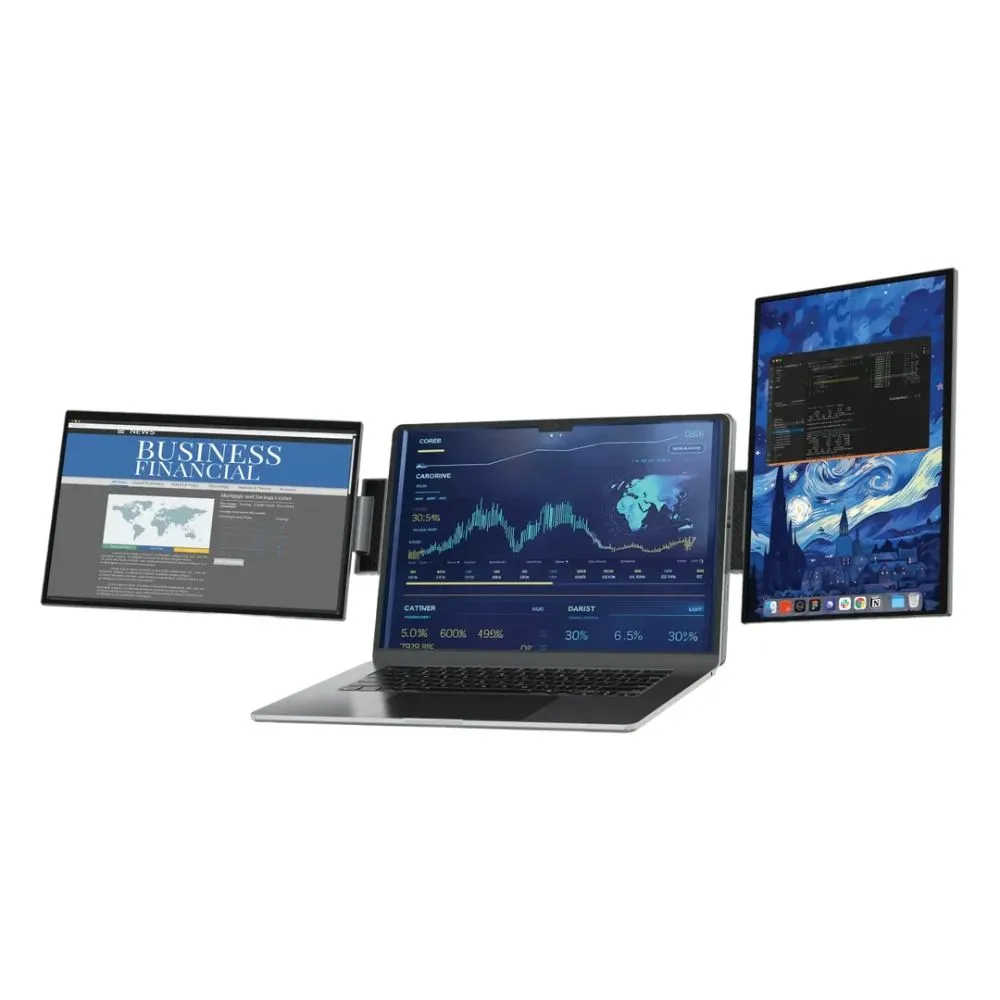
Expand your mobile workstation with the Powerology SkyFold 14″ Dual Display Laptop Monitor. Features dual 1920×1200 IPS-LCD screens, universal 11.6″-18″ laptop compatibility, USB-C/Mini HDMI connectivity, and built-in speakers. Available now at DSLR Zone.
Supercharge your workflow, multitask efficiently, and expand your mobile workstation with the Powerology SkyFold 14″ Dual Display Laptop Monitor . Engineered for professionals, remote workers, and content creators on the go, this innovative portable monitor attaches securely to laptops ranging from 11.6 to 18 inches , instantly transforming a single screen into an immersive multi-monitor command center. Featuring two crisp 1920 x 1200 resolution IPS-LCD screens with a 16:10 aspect ratio, it delivers sharp details, a 60Hz refresh rate, a 1000:1 contrast ratio, and wide 315-degree viewing angles for crystal-clear collaboration.
Built with a lightweight yet durable ABS+PC frame, the SkyFold folds down compactly for effortless travel while offering exceptional ergonomic flexibility, including 90-degree back panel rotation and independent screen configuration modes. Connectivity is seamless via versatile Mini HDMI, multi-function USB-C ports , and a 3.5mm audio jack. Complete with built-in dual 1W speakers, it provides a comprehensive, plug-and-play desktop environment whether you are working from a cafe, a client office, or your home desk.
Dual 14″ IPS-LCD Displays: Dual 1920 x 1200 resolution screens provide expansive workspace real estate with 70% sRGB color accuracy.
Universal Laptop Fit: Designed to attach easily and securely to laptops sized from 11.6 inches up to 18 inches using an integrated kickstand and clamp system.
Flexible 315° Viewing Angles: Supports multiple presentation and workspace modes with 90° back panel rotation adjustments.
Comprehensive Connectivity: Equipped with dual Mini HDMI ports, multi-purpose USB-C inputs, and a 3.5mm audio jack for wide device compatibility.
Built-In Stereo Sound: Features integrated dual 1W speakers for convenient video calls, media playback, and audio monitoring.
Lightweight & Travel-Friendly: Built from a rugged ABS+PC frame that packs down neatly into your backpack alongside your laptop.
💡 Pro-Tip: Utilize a single USB-C cable for both power and video transmission when connecting compatible laptops to keep your mobile workstation clean and clutter-free.
| Feature | Specification |
| Brand & Series | Powerology SkyFold Series |
| Model | Powerology SkyFold 14″ Dual Display Laptop Monitor |
| Screen Size & Type | Dual 14-Inch IPS-LCD Panels |
| Resolution & Aspect Ratio | 1920 x 1200 (WUXGA) / 16:10 Aspect Ratio |
| Performance Metrics | 60Hz Refresh Rate, 1000:1 Contrast Ratio, 300 cd/m² Brightness, 10ms Response Time |
| Color Gamut | 70% sRGB (16.7M Display Colors) |
| Viewing Angle | 315° Rotation / Flexible Folding Angles |
| Compatibility | Fits Laptops Ranging from 11.6 to 18 Inches |
| Inputs & Outputs | 2 x Mini HDMI, 3 x USB-C Ports, 1 x 3.5mm Audio Jack |
| Audio | Dual 1W Built-In Speakers |
| Materials & Weight | Lightweight ABS+PC Construction / Portable Foldable Chassis |
A: The monitor is designed with an adjustable clamp and kickstand mechanism that fits laptops ranging from 11.6 inches to 18 inches in screen size.
A: Depending on your laptop’s USB-C power delivery output, many modern systems can power both displays and transmit video signals using a single USB-C or Mini HDMI connection.
A: Absolutely! You can configure your display settings in Windows or macOS to extend your desktop, allowing you to run separate apps and windows on each screen.